
Register your account to manage your Nobles Cooperative Electric account anytime from anywhere.
Use your computer, tablet or phone!


Quick Tips
- Account Number (Member Number): Do not enter decimal points. For example, enter 12345.00 as 1234500 when paying online or by phone.
- Auto Pay: Your first payment is not processed immediately after enrollment. Auto Pay begins with your next billing cycle, so you'll need to make your current payment using another payment method.
- Pay by Phone (855-799-1641): Do not enter decimal points. For example, enter $129.89 as 12989. The system will confirm the correct dollar amount before processing your payment.
One-Time Online Payment
Use this option to make a one-time payment without creating an account. You'll need your Account/Member Number to complete your payment.
For added convenience, we recommend creating a SmartHub account to access features like Auto Pay, payment history, account management, and more.
Not quite ready to sign up for SmartHub?
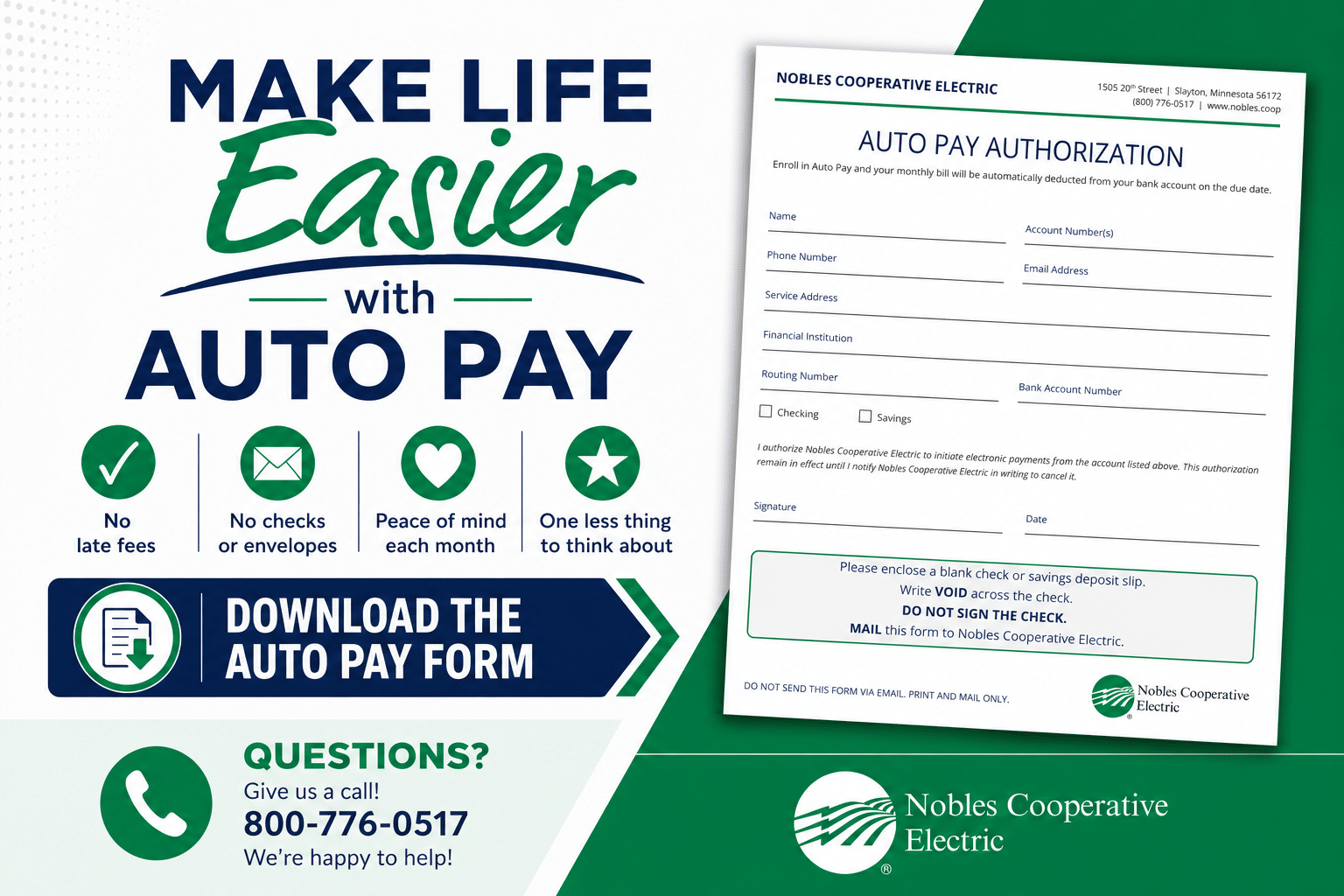
You can still enjoy the convenience of Automatic Payments —no SmartHub account required. Simply complete the Auto Pay Authorization Form and we'll take care of the rest.
How to Enroll in Autopay without Smarthub
- Download and complete the Auto Pay Authorization Form.
- Include:
- A voided check (write VOID across the check and do not sign it), or
- A savings account deposit slip.
- Mail or deliver your completed form to:
Nobles Cooperative Electric
PO Box 58
1505 20th Street
Slayton, MN 56172
For your protection, please do not email completed forms or banking information.
Once we receive your form, we'll process your enrollment and automatic payments will begin as soon as possible.
Please Note: If you enroll in Auto Pay using this paper form, you'll continue to receive a paper bill by mail for your records. To stop receiving paper bills and receive your monthly invoice by email, you'll need to create a SmartHub account and enroll in paperless billing. SmartHub also gives you secure online access to your account anytime.
Questions?
We're happy to help! Give us a call at 800-776-0517, and we'll walk you through the process.
is as easy as 1-2-3!
As you work down this page, you’ll complete the following checklist and be on your way to managing your account like never before! Make payments, report service interruptions, and monitor usage.
How TO:
How Can SmartHub Help?
SmartHub puts your account at your fingertips—anytime, anywhere.
- View & Pay Bills – Access your bill, make payments, and avoid late fees.
- Alerts & Notifications – Receive email or text updates about your account.
- Paperless Billing – Go paperless for fast, convenient access to your bill.
- Monitor Energy Use – Track your energy usage to better manage your monthly costs.
SmartHub makes it easy to manage your account with secure, convenient access whenever you need it.

SmartHub Registration Tips
- Account/Member Number: Use your account/member number from your bill. Do not enter decimal points. For example, enter 12345.00 as 1234500.
- Register Your Account: Following our system upgrade, all online users must register for a new SmartHub account to access features like daily and hourly energy usage, payment history, and account management.
- Existing Auto Pay: If you're already enrolled in Auto Pay using your bank account, no action is required. Your payments will continue to draft on or around the 30th of each month. We still encourage you to register for SmartHub to verify your account information.
- New Auto Pay: If you're enrolling in Auto Pay for the first time, it will begin with your next billing cycle. You'll need to make your current payment using another payment method.
FAQ: Setting up Smarthub
You can find your account number on a printed bill statement mailed to your residence or business.
You can also call us for assistance.
You may choose how you receive notifications from SmartHub (email or SMS) by updating your notifications preferences.
- Log in to your SmartHub account
- Click on "Notifications"
- Click Manage Contacts to add or change email address and phone numbers
- Enter verification code to activate
- Click on Manage Notifications to set up SMS and email alerts
You can save bank account and/or credit/debit card information for future one-time payments.
On the website:
- Click My Profile
- Click on Manage My Stored Payment Accounts and follow instructions
On the app:
- Select Settings
- Select Stored Payment Accounts and follow instructions
Auto Pay allows you to pay your monthly bill through an automated draft from your bank account or credit card at no extra charge. By enrolling in Auto Pay, you authorize us to withdraw funds from your selected account to pay your monthly bill on the due date.
How to sign up on the website:
- Click on Billing & Payments
- Click on Auto Pay Program
- Click on Sign Up for Auto Pay and follow instructions
How to sign up on the app:
- Select Bill & Pay
- Select Auto Pay Program and follow instructions
No. It is provided as an option for your convenience. If you do not sign up for paperless billing in SmartHub, you will continue to receive a monthly bill in your mail.
When we upgraded our systems, those who were previously enrolled in paperless billing were not able to be carried over, so while we understand it’s inconvenient, we do appreciate your understanding of having to enroll again.
You can choose to participate in paperless billing, which sends bill statements to the email address on your account. You will no longer receive a copy of your bill in the mail.
Here's how to change your preference to participate in paperless billing:
On the website:
- Click on My Profile
- Click on Update My Paperless Settings
- Choose your paperless preference
On the app:
- Select Settings
- Select Paperless Billing
- Choose your paperless preference
You can view your energy use on the website and app.
On the website:
- Click My Usage
- Select My Usage
- Then, select Usage Explorer
On the app:
- Select the Energy Use icon to view your energy use.
How to Register for SmartHUB
How to set up Auto Pay
How to manage notifications
FREQUENTLY ASKED QUESTIONS (FAQ)
- Yes. All critical information is encrypted in every transaction run and no personal information is stored on your phone or tablet.
- Mobile devices do offer you the ability to store your login information for apps installed on the device. If you choose to store your login information, any person who has access to your mobile device can access your account.
- Both platforms are part of our online account management system for members.
- Both the web version and mobile app allow you to securely access their account information, change your personal information, manage notifications, update stored payment methods, view bills and payment history, make payments, and report issues.
- The free, secure mobile app is available to download and install on mobile devices and tablets.
- Yes. SmartHub shows all of your accounts, along with the amounts due for those accounts. You may make a payment to a single account or multiple accounts from both the website and mobile app.
- The information you see in the app and on the website is shown in real-time.
- However, if you keep your app or web version open for an extended time, you should refresh the page by selecting a new option in order to ensure the information is current.
- Please know that throughout this communication process, we will never call or email you to ask for credit card numbers, bank account routing numbers or any other type of personal information.
- If you do receive such communication from someone claiming to be a our Employee, please report it to us.
Need More Help?
Member Service Phone Number
Make a Payment or Report an Outage 24/7
Have questions?
Your Cooperative team is here to assist with your membership and service questions.